Deep Dive
Mastering Functional Safety: Everything About Tools, Processes & Standards

Mastering Functional Safety: Everything About Tools, Processes & Standards
Functional safety is the foundation of every dependable system, whether in automotive, robotics, avionics, industrial automation, or emerging AI-driven applications. Safe systems do not happen by accident; they are the result of disciplined processes, qualified tools, proven methods, and rigorous compliance.
Modern safety‑critical products rely on more than just hardware and software. Safety must also cover data, development tools, reusable libraries, and workflows. A single issue, such as a compiler bug generating an incorrect binary or a test tool producing false results, can jeopardize the entire product. Likewise, an unqualified reused library can spread defects across multiple ECUs and OEMs.
Standards like ISO 26262, IEC 61508, DO‑178C, and EN 50716 require companies to show that their processes are controlled, their tools are properly classified and used, their reusable libraries are qualified, and their products are developed through a documented, compliant workflow. Functional safety is therefore both a technical challenge and a process‑driven discipline.
Building safe products requires considering safety across multiple layers of the system. Each layer carries its own risks, obligations, and evidence needs; meaning a single weakness can compromise the entire product.
Hardware Safety - Ensures physical components function reliably and meet safety requirements.
Software Safety - Covers both application-specific code and integrated runtime behavior.
System Safety - Ensures the entire system architecture behaves safely under normal and fault conditions.
Library Safety - Ensures reused, unchanged components behave consistently across different products.
Tool Safety - Addresses risks introduced by development tools such as compilers, test tools, or code generators.
Data Safety (critical for AI and ML systems) - Ensures data quality and completeness, which directly influence the safety of AI‑driven predictions.
Safety standards classify development assets because each has different risk levels and compliance needs:
Application Software – Product‑specific code created for a particular ECU or feature set.
Libraries – Reusable, unchanged software components integrated into the product.
Tools – Used during development but not delivered (e.g., compilers, modeling tools or test tools).
Application software is the most safety‑critical and must follow the full functional safety lifecycle.
Libraries carry moderate risk and require controlled integration and documentation.
Tools, though not part of the final product, can introduce hidden defects if they produce incorrect outputs.
To control these risks, standards classify tools by impact and failure detectability using Tool Confidence Levels (TCL). Higher‑risk tools require qualification and defined safe‑use measures.
Functional safety standards rely on structured risk frameworks in ISO 26262, such as the ASIL levels (A–D), to ensure that development rigor aligns with the potential severity of hazards. These integrity levels are determined through hazard and risk analysis, evaluating severity, controllability, and exposure.
The result defines how strong your development, verification, and validation methods must be to reduce the risk to an acceptable level. ASIL‑D, representing the highest risk, requires the most risk-reduction efforts, while ASIL‑A requires lighter but still systematic risk-reduction efforts. This ensures risks are reduced to an acceptable level, and the product is developed safely and consistently.
Functional safety requires a defined process and clear evidence that the process was followed correctly. Together, the Safety Plan (Process) and Safety Case (Product Evidence) form the core of this assurance.
The Safety Plan: Your Blueprint for Safe Development
The Safety Plan defines system, hardware, and software safety concepts, required verification activities, and how tools and libraries are used, classified, and qualified. It also defines test strategies, safety mechanisms, and tool‑related rigor.
Because tools automate many development steps, tool confidence is documented through:
TCR – Tool Classification Report
TSM – Tool Safety Manual
TQP – Tool Qualification Plan (if qualification is needed)
TQR – Tool Qualification Report (evidence of qualification)
Two supporting documents ensure transparency and compliance:
Process Report – Describes the development process and tool usage
Compliance Report – Explains how each safety requirement is met
The Safety Case: Proving Your Product Is Safe
A safety case proves that the Safety Plan has been followed and that risks are adequately controlled. It includes system, hardware, and software safety evidence, verification results, coverage reports, and tool‑usage documentation. Every activity defined in the Safety Plan must be backed by traceable, auditable proof.
Together, they demonstrate compliance and justify releasing a product to market.
The Safety Plan and Safety Case work together as a closed-loop safety assurance system to:
Define how to build the product safely
Execute the development according to the defined process
Prove through evidence that every safety requirement has been fulfilled
Only when the Safety Case is complete can the product be considered compliant and ready for safety assessment or certification.

Validas’ Process Modeling Tool (PMT) provides a structured, model‑based approach to developing and managing safety‑critical processes. It eliminates inconsistencies, checks for completeness, and ensures that all requirements from safety standards such as ISO 26262, IEC 61508, and others are fully addressed. PMT also generates the required process and compliance reports needed for assessments and certification.
Models provide a structured abstraction of the development process, making complex workflows visible, understandable, and analyzable. PMT uses semi-formal models to:
Structure process descriptions
Check processes and compliance argumentation for consistency and missing elements
Enable deeper analysis and automated document generation
Generate useful artifacts, such as checklists for verification and validation
Handle variants and parameters in processes
This approach ensures every safety‑relevant requirement is addressed and linked to a concrete process step, artifact, or verification activity.
Process modeling ensures that no activity, artifact, or responsibility is missed. It gives development teams, safety managers, and assessors complete confidence that:
Processes are correct and complete
Requirements are fully covered
Risks arising from missing steps or unclear responsibilities are eliminated
Generated documentation faithfully reflects the implemented process
By combining clarity, automation, and verification, PMT significantly reduces assessment effort while increasing the reliability of your safety process.
Development processes ensure consistent safety practices, but tools themselves can introduce hidden risks. Toolchain Analysis (TCA) evaluates how each tool affects product safety. ISO 26262 defines the Tool Confidence Level (TCL) to determine how much qualification is needed to control tool‑related risks.
TCL is derived from two key factors:
1. Tool Impact (TI)
Evaluates whether a tool can introduce or fail to detect errors that may affect the safety of the final product.
TI1: No safety impact
TI2: Potential safety impact
2. Tool Error Detection (TD)
Assesses how likely it is that errors introduced into the product or the safety case by the tool would be detected or prevented by other measures.
TD1: High detection probability
TD2: Medium detection probability
TD3: Low or unknown detection probability
The combination of TI and TD yields the TCL level:
TCL1 (TI = 1 or TD = 1): No qualification required
TCL2/3 (TI = 2 & TD = 2/3): Qualification required, with TCL3 being the most critical
Tools such as compilers, code generators, and test tools can unintentionally introduce faults. If those faults are hard to detect, they pose significant safety risks, even though the tools are not part of the final product. Tools with high impact and low detectability must undergo qualification to ensure they behave correctly across safety‑relevant use cases. Qualification typically includes analysis, testing, reviews, and defined usage guidelines to reduce the risk of tool‑related errors.
1. Toolchain Analysis (Classification)
We assess every tool in your toolchain to determine:
Whether the tool has safety impact
Whether potential tool errors are detectable
Which tools require qualification, and which can be used safely with proper guidelines
This step often reduces qualification effort significantly by showing where process measures are sufficient.
2. Qualification Kit Creation
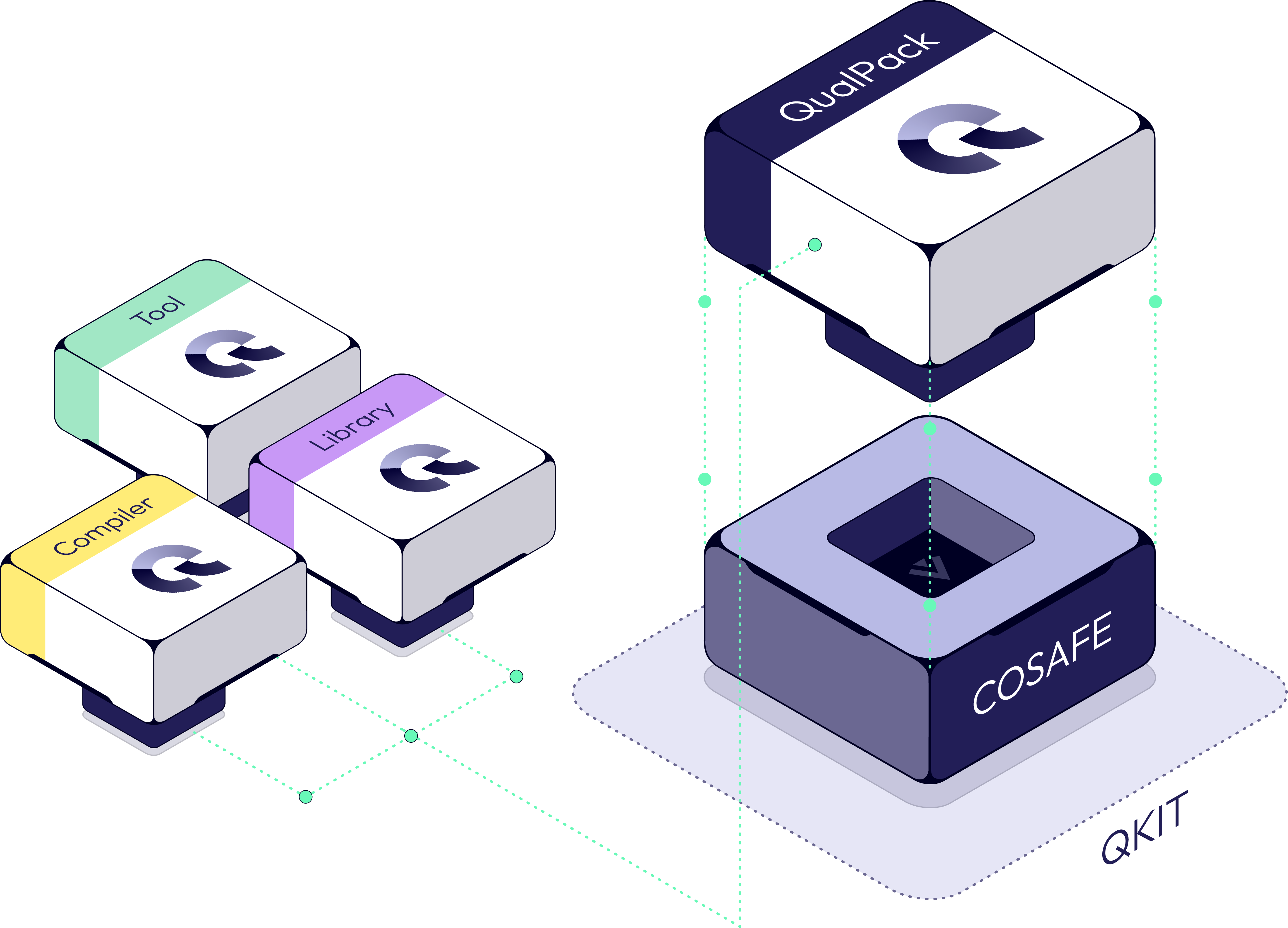
We build a complete, automation‑ready Qualification Kit that lets you repeat qualifications efficiently across versions and projects.
Qualification Kit includes:
Test Automation Units
Templates and configuration manuals
Test cases covering relevant features
Models of potential tool errors
Auto‑generated Tool Safety Manual
Auto‑generated Tool / Library Qualification Report
This automation enables fast requalification, often demonstrated in minutes.
For tools deemed critical and low on detectability, we perform systematic validation, ensuring the tool behaves correctly in all relevant use cases.
This includes:
Testing critical features
Evaluating corner cases
Documenting error handling and mitigations
Ensuring the safe and compliant use of development tools requires clear documentation. The most important document for tool users is the Tool Safety Manual, supported by a structured set of qualification documents.
1) Tool Safety Manual (Most Important for Tool Users)
The Tool Safety Manual provides developers with everything they need to use a tool safely. It contains:
The version of the tool
The list of allowed / forbidden tool features
Mitigations for potential errors that are detectable or avoidable
The relevant known bugs found during qualification and existing bug trackers
2) Supporting Tool Qualification Documents
Alongside the Tool Safety Manual, a complete qualification package includes:
Tool Qualification Plan
Tool Qualification Report
Tool Classification Report
These documents provide the safety manager, assessors, and certification bodies with the evidence needed to confirm correct tool behavior and compliance.
All four documents are automatically generated from Validas' Tool Qualification Kits.
During qualification, any newly discovered corner cases or issues are documented and integrated into the Tool Safety Manual, ensuring future users apply the correct mitigations.
Most toolchains include dozens or hundreds of tools. By modeling tool interactions, TCA shows where errors are naturally detected by other steps. This often eliminates 90–95% of qualification effort—only truly critical tools require full qualification.
This approach ensures safety, reduces complexity, and minimizes cost without compromising compliance.
Safety‑relevant development relies on both structured processes and the tools that support them.
Linking tools directly to process steps identifies:
All safety‑relevant tools
Tool use cases (inputs, outputs, and interactions)
Missing methods or gaps in development workflows
Tool Confidence Level (TCL) requirements
This combined understanding strengthens completeness, compliance, and tool safety.
PMT automatically connects process models with tool usage. By specifying tools directly within process models, PMT automatically generates:
A complete list of relevant tools
All tool use cases with inputs/outputs
Initial potential tool errors
A structured starting point for Toolchain Analysis
This removes guesswork and ensures nothing is overlooked.
COSAFE (Compliance and Safety Framework) brings together development processes, toolchain insights, and applicable safety standards into one integrated workflow. It enables organizations to build compliant processes, assess tool safety, and generate all required safety documentation consistently.
COSAFE connects:
Development Processes
Toolchains
Safety Standards
Compliance and Verification Checklists
Tool Safety Models
This integration streamlines safety planning, toolchain analysis, and the generation of safety plans and safety cases.
Our structured approach helps organizations establish fully compliant processes and toolchains, from initial planning to final product safety documentation.
Step 1 — Workshop & Safety Standard Selection
We begin with a workshop to identify the safety standards relevant to your product domain and outline your development process.
Step 2 — Safety Planning
We describe your process and tools, verify completeness, and generate your process report, compliance report, and V&V checklists.
Step 3 — Toolchain Analysis (Optional)
If required by the selected standard, we classify tools, propose mitigations, and qualify any remaining critical tools.
Step 4 — Build Product & Safety Case
You follow the certified process to develop your product, and we support documentation of evidence in the final safety case.